Stop Writing Boilerplate: Scaffold a Flutter Clean Architecture App in 60 Seconds!

Hey fellow Flutter developers! 👋
Let’s be honest for a second. We’ve all been there: You get a brilliant idea for a new mobile app, your coffee is hot, and you’re ready to code. But then reality hits.
Before you can build anything cool, you have to spend the next two hours setting up your folders, writing base classes, configuring interceptors for your HTTP client, setting up localization, and building custom widgets. By the time you’re finished writing the boilerplate, your coffee is cold and your coding energy is gone.
What if you could skip all the boring setup and jump straight into writing your app’s actual features?
Enter flutter_architecture_cli—a command-line tool built to instantly generate a robust, production-ready Clean Architecture boilerplate for Flutter using RxDart and Provider.

The Tech Stack: Why Flutter + RxDart + Provider?
Before we run any commands, let’s look at why this combination is a developer’s dream stack:
1. Clean Architecture (Without the Over-Engineering)
Clean Architecture divides your code into clear layers (Data, Domain, Presentation).
- Your UI doesn’t care how the database works.
- Your API Client doesn’t care how the UI looks. This means you can change your backend or swap a UI component without breaking the entire application.
2. RxDart (Reactive Streams)
Many developers default to basic state management packages, but RxDart is a hidden superpower. By using reactive streams (BehaviorSubject and PublishSubject), you get fine-grained control over asynchronous data flow. You can easily merge, debounce, map, and transform network responses in real-time before they even touch the screen.
3. Provider (Clean Dependency Injection)
Provider acts as the clean glue that connects your UI views to your RxDart Blocs. It keeps the dependency injection simple, readable, and highly testable.
Step-by-Step Guide: Let’s Scaffold an App!
Let’s walk through how to build your first project using the CLI.
Step 1: Install the CLI
To get started, activate the tool globally on your machine:
dart pub global activate flutter_architecture_cli(Alternative: If you want to use it inside a specific project without global installation, run flutter pub add --dev flutter_architecture_cli instead).
Step 2: Bootstrap Your Application
To create a fully configured, clean architecture Flutter app, navigate to your target directory and run:
flutter_architecture_cli create my_awesome_appWhat happens behind the scenes?
The CLI runs flutter create and then instantly constructs your entire project architecture:
- Configures Dio with Token, Logging, and Error Interceptors.
- Sets up a generic
BaseUiStateclass andBaseMapperto easily transform backend DTO models into clean UI entities. - Writes global theme data, custom validators, navigation helpers, and responsive utility extensions.
- Adds highly polished reusable widgets like
AppButton,AppTextField,AppLoader, and custom loaders.
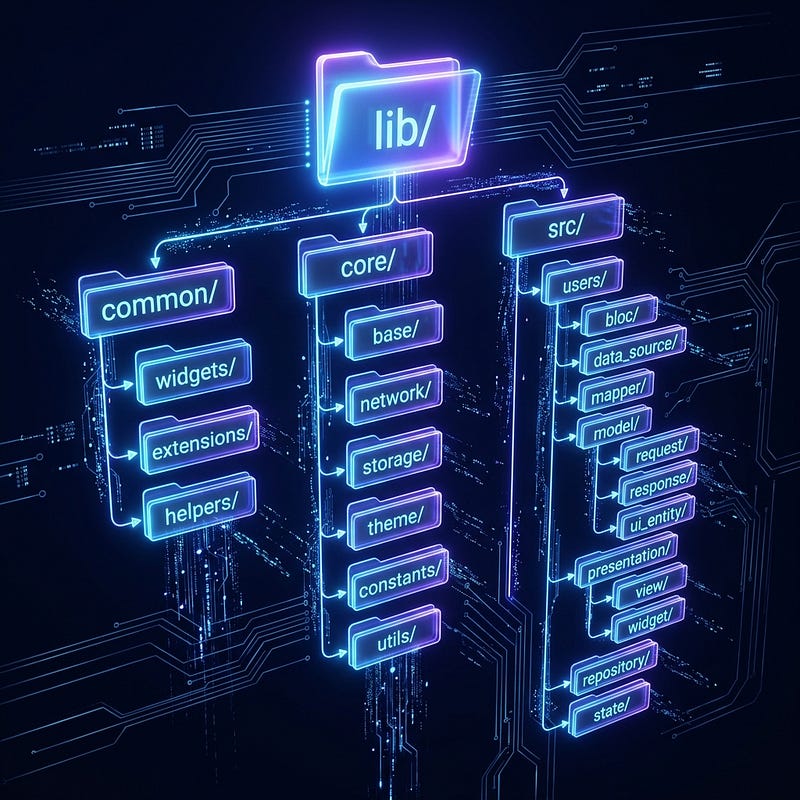
Exploring the Generated Structure
Once the CLI finishes generating your application, it leaves you with a structured layout that keeps your codebase clean and organized.
The lib/common/ Directory
The common folder acts as the central repository for shared UI widgets, custom extensions, and routing/navigation helpers. This includes highly reusable widgets like text buttons, custom loaders, and text fields that are standard across all screens. By keeping these elements in a single folder, you ensure complete design consistency throughout the app. If a design requirement changes, updating the widget in this directory will immediately reflect the changes globally across the entire project.
The lib/core/ Directory
The core folder is the technological engine of your Flutter app. It holds global configurations, themes, storage layers, and network services that the rest of the application depends on. Inside core, you will find your pre-configured HTTP ApiClient, SQLite or SharedPreferences services, localized translation files, and default app theme definitions. The core layer remains feature-independent, meaning nothing in this folder references specific feature modules, keeping it modular and reusable.
The lib/src/ Directory
The src directory holds your actual feature modules (e.g., users, products). Instead of keeping all files in a single flat folder, each feature contains a clean nested sub-tree that represents the complete Clean Architecture workflow:
bloc/: The Business Logic Component folder. This houses your controllers and state publishers. It converts incoming events and actions into state streams using RxDart'sBehaviorSubjectpipelines. It handles UI interaction logic without being tightly coupled to any specific Flutter widget.data_source/: The network connection layer. This class communicates directly with the globalApiClientto execute REST API requests (like fetching list data, sending post requests, or updating items). It is responsible for calling endpoints and handling network-level queries.mapper/: The object translation layer. The mapper inherits fromBaseMapperand translates raw API response DTOs into domain-ready UI Entities. This ensures that if the backend database schema changes, you only need to update the mapper, leaving your UI presentation models completely untouched.model/: The model layer holds your data structures, divided into three key subfolders:request/: Holds request parameters, body payloads, or query parameters needed for outgoing API requests.response/: Holds raw Data Transfer Objects (DTOs) that match the JSON structure returned from your API endpoints.ui_entity/: Holds clean, mapped models consumed directly by your Flutter UI widgets.presentation/: The user interface layer, divided into:view/: Contains your main screen views (e.g.login_screen.dart), which listen to the Bloc's emitted state streams using aStreamBuilder.widget/: Contains feature-specific sub-widgets used to modularize the screen's layout, keeping your view classes small and readable.repository/: The domain repository layer. This class acts as the mediator between the DataSource and the Bloc. It requests DTO streams from the DataSource, maps them using the Mapper, and passes the clean UI Entity streams up to the Bloc, coordinating caching or offline-first storage if needed.state/: The state management configuration layer. This folder contains your feature's provider registrations and dependency injection configurations, wiring up the DataSource, Repository, and Bloc so they are cleanly injected into the view via Provider.

The Power of Pre-Built Common Widgets
One of the biggest time-savers in this boilerplate is the presence of pre-built, production-ready common widgets located inside lib/common/widgets/.
AppButton: A fully customizable, material-compliant button template. It has built-in support for disabled states, hover micro-animations, and automatically replaces the button text with your customizedAppLoaderwhen in a loading state.AppTextField: A premium input field complete with input validators, secure text toggles (for passwords), custom borders, and focus highlight shadows.AppLoader&AppShimmer: A standardized progress indicator widget and layout placeholder used to display clean skeletal loading states when fetching remote data.AppNetworkStatusWidget: A global utility widget that listens to real-time internet connectivity updates and displays a clean banner when the device goes offline.
By utilizing these common widgets, developers avoid writing duplicate layout logic and can maintain absolute branding consistency throughout the app!
Core Benefits of Using This Structure
Adhering to this Clean Architecture model yields three major benefits for developers and teams:
- Unmatched Testability: Because the business logic (Bloc), data access (DataSource), and UI (View) are completely decoupled, you can write unit tests for your Blocs and repositories without needing to mock complex Flutter UI widgets.
- Parallel Development: Developers can work on the same feature simultaneously without getting merge conflicts. One developer can build the UI screens, another can write the Bloc streams, and a third can configure the data source API endpoints.
- No API Leakage: Thanks to the
BaseMapperlayer, raw backend database fields never leak into your presentation views. If your backend changes a JSON key, you only need to update the mapper class, leaving the rest of your app untouched!

Deep Dive into the Code Flow
The generated codebase focuses on a clean, single-directional data flow using reactive streams:
- DataSource: The data source layer communicates directly with the network client. It executes HTTP requests (GET, POST, etc.) and parses the raw JSON response payload into a type-safe Response DTO (Data Transfer Object) inside
model/response/. - Mapper: The mapping layer is critical for maintaining clean architecture boundaries. It inherits from
BaseMapperand translates the raw network response objects into clean, domain-specific UI Entities insidemodel/ui_entity/. This keeps API changes from directly breaking your visual UI widgets. - Repository: The repository layer is the data mediator. It requests raw DTO streams from the DataSource, runs them through the Mapper, and passes the UI Entity streams up to the business logic layer.
- Bloc: The business logic controller handles user interactions and API state management. It processes repository streams and formats the result into a unified
BaseUiStateobject representing loading, success, or failure. This state is emitted to the UI views using RxDartBehaviorSubjectstreams. - Presentation (View): The presentation layer contains your Flutter screens. It listens to the Bloc’s emitted stream using standard
StreamBuilderwidgets and renders the loading, completed, or error states dynamically on the device.

Detailed Command Reference
Once your app is created, you don’t have to write feature directories manually. The CLI provides a suite of dedicated sub-commands to scale your codebase:
1. Create a Complete Feature
Scaffolds a complete clean architecture feature directory with all subfolders (bloc, data_source, mapper, model/request, model/response, model/ui_entity, presentation/view, presentation/widget, repository, state):
flutter_architecture_cli create_feature <feature_name>Example:
flutter_architecture_cli create_feature products2. Add a Screen
Adds a new screen layout to your feature presentation layer:
flutter_architecture_cli create_screen <screen_name> -f <feature_name>Example:
flutter_architecture_cli create_screen product_detail -f products3. Generate Models
Generates response data objects (DTOs) and matching UI Entity classes in the correct subfolders:
flutter_architecture_cli create_model <model_name> -f <feature_name>Example:
flutter_architecture_cli create_model category -f products4. Create Data Sources
Creates a dedicated network data source for API calls:
flutter_architecture_cli create_datasource <name> -f <feature_name>5. Create Repositories
Creates the domain repository class that acts as the bridge between your DataSource and Bloc:
flutter_architecture_cli create_repository <name> -f <feature_name>Future Goals / Roadmap
We plan to expand the CLI tool to support multiple popular state management architectures. Future updates will include flags to generate project structures for:
- flutter_bloc: Support for Bloc/Cubit architectures.
- Riverpod: Support for modern declarative state management and providers.
- GetX: Support for lightweight and high-performance reactive programming.

Join the Project!
This generator is open-source and ready for you to use on your next big project!
- 📦 Pub.dev: flutter_architecture_cli
- 💻 GitHub Repository: Dharti1623/flutter_architecture_cli
- ☕ Show some support: Buy Me A Coffee
Give the CLI a run on your next project, drop a star on GitHub, and let us know what you think in the comments! Happy coding! 🚀


.png)
Comments
Post a Comment